What Is Server-Side Tracking?

Server-side tracking is a way of sending conversion data from a server you control directly to platforms like Meta, Google Ads and GA4, instead of relying only on tracking scripts in the visitor's browser. It reduces the conversions lost to ad blockers and browser privacy limits, and it lets you send offline events such as booked calls and CRM sales back to your ad platforms.
If your ad platforms report fewer leads or sales than your CRM or bank account, this guide explains why it happens and what server-side tracking does about it. It covers how it works, what it costs, what it does not fix, and three ways to set it up.
Server-side tracking vs browser pixels: the basic idea
In traditional tracking, every ad platform installs its own script on your website: the Meta Pixel, the Google tag, the LinkedIn Insight Tag and so on. When a visitor converts, each script sends the event from the visitor's browser straight to its platform. That is client-side tracking.
With server-side tracking, the browser sends events to one endpoint you control. Your server can then add data the browser never had, such as CRM status, call outcomes or order value, and forward each event to the platforms through their server APIs. For Meta that is the Conversions API; for Google it is server-side tagging, offline conversion imports and Enhanced Conversions.
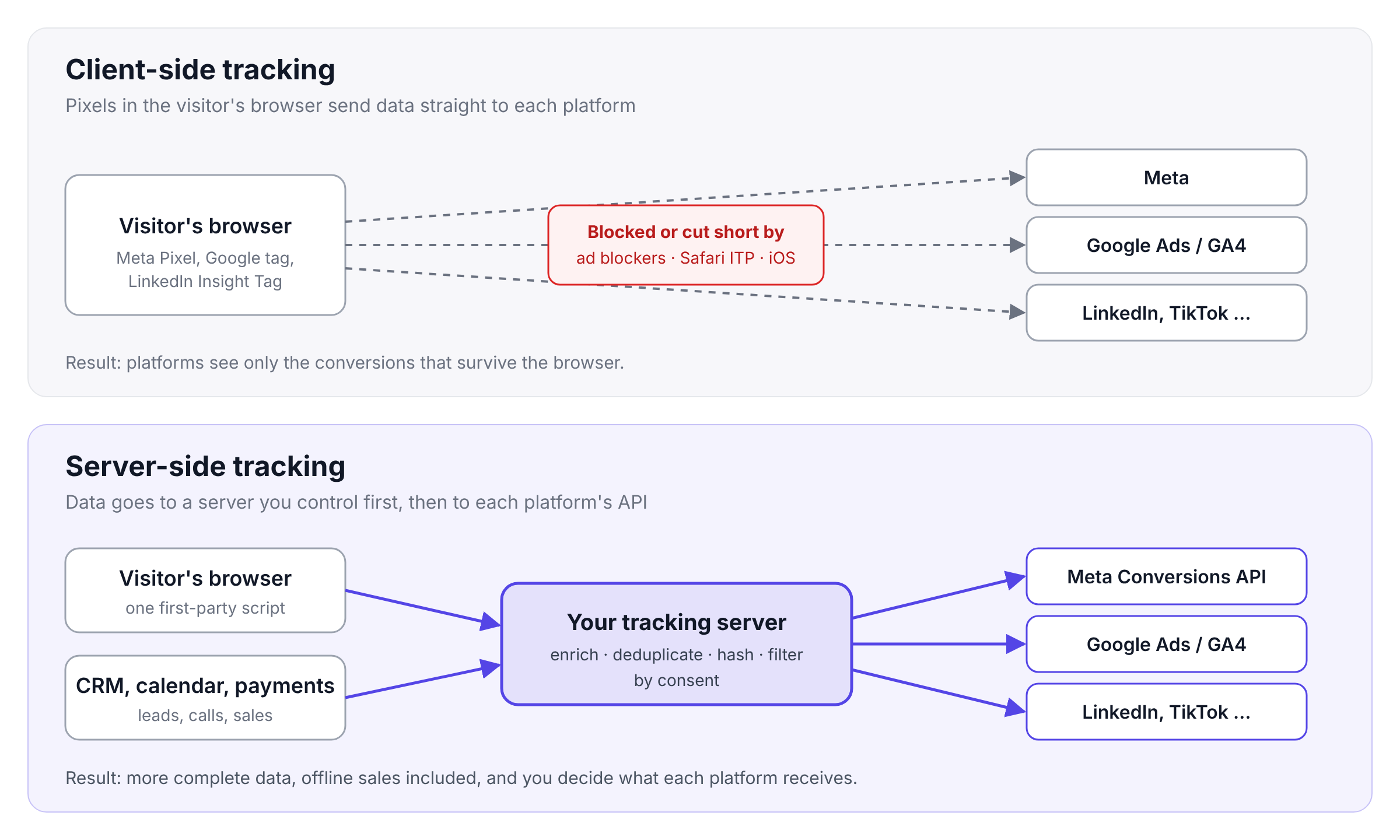
You will also see the term server-side tagging. Google uses it for running Google Tag Manager in a server container that you host. Server-side tagging is one way to do server-side tracking, not the only one.
Server-side vs client-side tracking
The two approaches are not opposites. Meta itself recommends running the Conversions API in addition to the Pixel, which it calls a redundant setup. The table shows what each side does well.
| Client-side tracking | Server-side tracking | |
|---|---|---|
| Where data is sent from | The visitor's browser | A server you control |
| Affected by ad blockers | Yes, scripts and requests are often blocked | Less; the server-to-platform step can't be blocked, though the browser-to-server step sometimes can |
| Affected by Safari ITP cookie limits | Yes, script-set cookies are capped at 7 days | Less, depending on how cookies are set |
| Offline events (calls, CRM deals, renewals) | No | Yes |
| Control over what each platform receives | Low; each pixel collects what it collects | High; you choose fields, hash and filter |
| Page speed impact | One script per platform | Fewer scripts in the browser |
| Consent still required in the EU | Yes | Yes |
| Setup effort | Low | Medium to high, or low with a managed platform |
| Typical cost | Free | Hosting or a subscription |
Why browser tracking loses data in 2026
Browser pixels were built for a web without privacy controls. Four changes now cut into the data they deliver.
Ad blockers. Nearly 1 in 3 consumers globally use an ad blocker, according to GWI (2025), with 15% in North America and 23% in Europe. Most blockers also block tracking scripts, so those conversions never reach the platforms.
Safari Intelligent Tracking Prevention (ITP). Since ITP 2.1, cookies created through JavaScript in Safari expire after seven days. When a visitor arrives from a domain Safari classifies as a tracker, through a link with tracking parameters such as fbclid, the cap drops to one day. A visitor who clicks your ad on Monday and buys ten days later, without visiting in between, looks like a new visitor to your site.
iOS privacy features. Since iOS 14.5, App Tracking Transparency requires apps to ask permission before tracking people across other companies' apps and websites. Since 2023, Link Tracking Protection removes tracking information from links shared in Messages and Mail, and from links in Safari Private Browsing. Server-side tracking does not override a person's choice to opt out of tracking; it reduces losses caused by browser limits.
In-app browsers and payment redirects. A visitor who clicks your ad inside Instagram, then finishes the purchase in Safari or after a bank redirect, ends up converting in a different browser than the one they clicked in. The pixel on the thank-you page often cannot connect the sale to the click.
What did not happen: Chrome did not remove third-party cookies. In April 2025 Google announced it would keep its current approach to third-party cookie choice and not roll out a new standalone prompt. The data loss above comes from ad blockers, Safari, iOS, in-app browsers and redirects, not from Chrome.
How does server-side tracking work?
Most setups follow the same five steps, whichever tool you use.
- Collect. A first-party script on your site, served from your own domain, records page views, form submissions, checkouts and click IDs such as
gclidandfbclid. - Receive. The events are sent to your tracking server instead of, or alongside, each platform's pixel.
- Enrich (add context). The server joins events with data the browser never sees: the lead's status in your CRM, whether a booked call happened, the order value from your payment provider.
- Prepare. Personal data such as email and phone is cleaned up (lowercased, spaces removed) and hashed with SHA-256 before it leaves your server, which is the format Google and Meta expect. Events without consent are filtered out.
- Send. The server forwards each event to the platform APIs, with a unique event ID so platforms can deduplicate.
Deduplication: the step most setups get wrong
If you run the Pixel and the Conversions API together, Meta receives most conversions twice (more in our Meta Conversions API guide). The reliable way to make Meta count them once is to give both events the same event_name and the same event_id. Meta only matches events received within 48 hours of the first one.
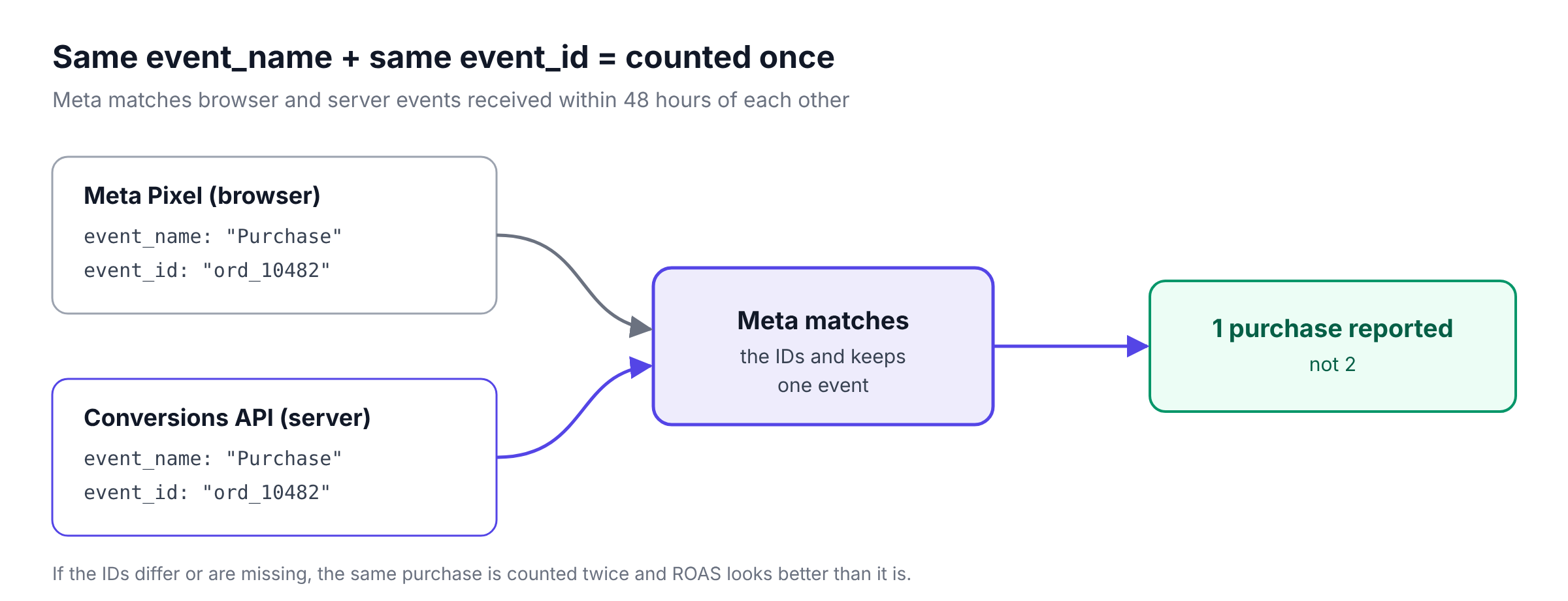
If the IDs are missing or do not match, sales can be counted twice. Reported ROAS is inflated, and the algorithm optimises toward numbers that are not real. Always check deduplication in Meta Events Manager after setup.
Match quality
Server events only help if the platform can connect them to a person who saw an ad. Meta scores this as Event Match Quality, out of 10 (Meta best practices). Sending hashed email, phone, click ID and the visitor's IP address and browser details with each event raises the score. Only matched events can be used for attribution and ad delivery.
Benefits of server-side tracking
More conversions reach the ad platforms. Events no longer depend on a script surviving the browser. Meta reported in April 2026 that advertisers using the Conversions API for web events saw on average a 17.8% lower cost per result than those without it.
Better optimisation. Smart Bidding, Advantage+ and lookalike audiences learn from the conversions they see. More complete and more valuable conversion data means the algorithm finds more people like your real customers.
Offline and downstream events. You can send what actually makes money: a qualified lead, a call that took place, a deal closed in the CRM, a subscription renewal. Browser pixels cannot see any of these.
Control over your data. You decide which fields each platform receives. Personal data can be hashed or removed before it leaves your server.
Faster pages. If you remove pixels you no longer need, one first-party script can replace several third-party scripts and reduce JavaScript in the browser.
Attribution beyond Safari's cookie limits. Click IDs stored on your server can be matched to sales weeks later, even after the browser cookie has expired. Google Ads lets you set conversion windows of up to 90 days, depending on the conversion source.
Server-side tracking for leads, calls and CRM sales
Most guides about server-side tracking are written for e-commerce: a purchase happens on the website and is sent to Meta. For businesses that sell through leads, sales calls or a CRM, the bigger problem is different. The valuable conversion happens after the website, where no pixel can see it.
A typical lead-generation funnel looks like this:
- A visitor clicks a Meta ad and submits a form. The Pixel records a lead.
- Your sales team books a call in a calendar tool. No pixel sees it.
- The call happens and the lead becomes an opportunity in your CRM. No pixel sees it.
- The deal closes two weeks later. No pixel sees it.
If Meta only receives step 1, it optimises for people who fill in forms, including people who never pick up the phone. Server-side tracking lets you send steps 2 to 4 back to Meta and Google as conversions, tied to the original click. The algorithm then learns which ads bring customers, not just form fills.
This is the problem Klarvyn was built for. It collects events from your website, CRM, calendar and payment tools and sends the conversions you choose back to your ad platforms.
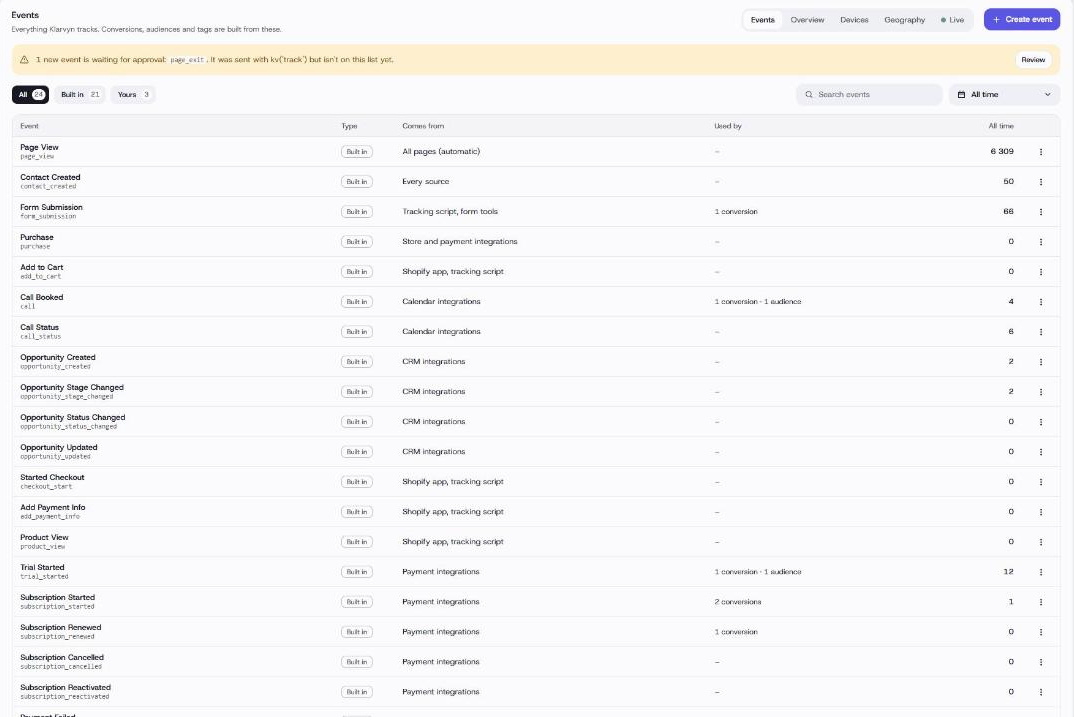
Klarvyn collects events from the tracking script and from CRM, calendar and payment integrations, so calls and deals can be sent to ad platforms as conversions.
Server-side tracking and GDPR
Server-side tracking is not a way around consent. Moving data collection from the browser to your server changes where the data is processed, not whether you need permission to collect it.
The European Data Protection Board's Guidelines 2/2023 on Article 5(3) of the ePrivacy Directive state that tracking pixels and JavaScript that instruct the browser to send information back fall within its scope, even when the receiving party differs from the one giving the instruction. A first-party script that sends events to your own server is still covered.
What server-side tracking does help with:
- Respecting consent centrally. You can drop or limit events from visitors who declined, in one place, before any data reaches a platform.
- Data minimisation. You send each platform only the fields it needs and hash personal data first.
- Data residency. You can choose where your server runs, for example in the EU.
For EEA traffic, Google requires consent signals before it uses personal data for advertising measurement, personalisation and remarketing. These are sent through Consent Mode with the ad_user_data and ad_personalization parameters, which Google introduced in 2024. Your server-side setup should pass these signals through.
This section is general information, not legal advice. Check your setup with your legal or privacy adviser.
Disadvantages and when it isn't worth it
Server-side tracking is not right for everyone. Consider these points before you start.
- Your numbers will change. Expect a shift in reported conversions, and compare against a baseline (see the FAQ below).
- Setup is technical if you do it yourself. A self-hosted Google Tag Manager server container needs DNS, hosting, tag configuration and testing.
- It costs money. Hosting or a subscription replaces free pixels.
- It does not create consent. Visitors who decline tracking still cannot be tracked.
- Not every tool supports it. Some platforms, such as session-recording tools, only work in the browser.
- Low volume. If you spend a few hundred dollars a month on ads and get a handful of conversions, the uplift may not justify the cost yet.
How to set up server-side tracking: 3 options
There are three main ways to get server-side tracking. They differ mainly in how much technical work you take on.
| 1. Self-hosted GTM server container | 2. Managed GTM hosting | 3. All-in-one platform | |
|---|---|---|---|
| What it is | Google Tag Manager server container on your own Google Cloud project | A provider hosts the server container; you configure the tags | A tool that handles collection, enrichment and platform APIs for you |
| Examples | Google Cloud Run | Stape, TAGGRS | Klarvyn and similar attribution platforms |
| Hosting cost | About $45 per server per month; Google recommends at least 2 servers | Paid plans from about $17 per month (Stape, billed annually), rising with traffic | Subscription, Klarvyn from $99 per month |
| Who sets it up | Developer or tracking specialist | Tracking specialist or confident marketer | Marketer, no developer needed |
| CRM, call and offline events | Possible, needs custom work | Possible, needs custom work | Built in, through integrations |
| Attribution reporting | No, you send data only | No, you send data only | Yes, reporting and sending in one tool |
| Best for | Teams with a developer and specific needs | Teams comfortable in Google Tag Manager | Teams without a developer or tracking specialist |
Prices as of November 2026. Check each provider's current pricing.
Whichever option you choose, check these points before you call the setup done:
- Events arrive in each platform's test tool (Meta Events Manager, Google Tag Assistant)
- Deduplication works: browser and server events share the same event ID
- Event Match Quality in Meta is acceptable for your main conversion events
- Consent choices are respected server-side
- Offline conversions (calls, deals) are tied to the original click ID
- You have a baseline from before the switch to compare against
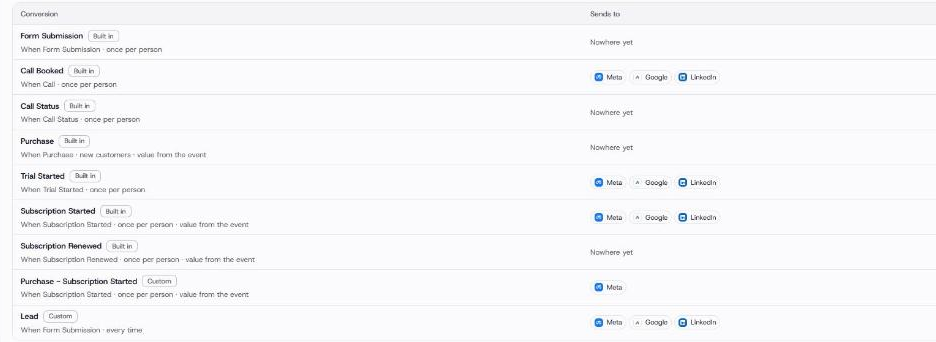
In Klarvyn, each conversion is mapped to the ad platforms it should be sent to.
Server-side tracking by platform
Each ad platform has its own server API. The principle is the same; the details differ.
- Meta (Facebook and Instagram): the Conversions API. Run it alongside the Pixel and deduplicate with
event_id. Read our Meta Conversions API guide. - Google Ads: Enhanced Conversions for web and for leads, plus offline conversion import with the GCLID.
- GA4: server-side tagging through a GTM server container, or the Measurement Protocol.
- TikTok: the Events API. LinkedIn: the Conversions API.
Frequently asked questions
Is server-side tracking GDPR compliant?
It can be, but it is not compliant by default. You still need consent for tracking under the ePrivacy Directive and a legal basis under GDPR. Server-side tracking makes it easier to respect consent and minimise data in one place.
Do I still need a cookie banner with server-side tracking?
In the EU and UK, yes, if you track visitors for advertising. For analytics it is usually required too, although some countries exempt limited audience measurement. Server-side tracking changes where data is processed, not whether consent is required.
Does server-side tracking bypass ad blockers?
Largely, because data is sent from your server to the platform rather than from the browser. The first-party script on your site can still be blocked by some tools, and you should not track visitors who have declined consent.
Do I need Google Tag Manager for server-side tracking?
No. A GTM server container is one option. You can also use platform APIs directly or an all-in-one platform that handles the server side for you.
How much does server-side tracking cost?
A self-hosted GTM server container on Google Cloud costs about $45 per server per month, and Google recommends at least two. Managed hosting has paid plans from about $17 per month (Stape, billed annually), rising with traffic. All-in-one platforms are priced as subscriptions.
What is the difference between server-side tracking and server-side tagging?
Server-side tagging is Google's name for running Google Tag Manager in a server container. Server-side tracking is the broader concept of sending data from a server instead of the browser, by any method.
Will my reported conversions change?
Usually they go up, because conversions the browser missed now reach the platform. Run old and new setups in parallel for a few weeks and check deduplication so you do not count the same conversion twice.
Can I send offline conversions like booked calls and CRM sales?
Yes, and for lead-generation businesses this is often the biggest benefit. Store the click ID with the lead, then send the call or sale to the ad platform as a conversion when it happens.
Summary
Server-side tracking sends conversion data from a server you control instead of relying only on the browser. It recovers conversions lost to ad blockers, Safari and iOS, lets you send calls and CRM sales back to your ad platforms, and gives you control over what each platform receives. It does not remove the need for consent, and it is only as good as its deduplication and match quality.
If you want to see where your current tracking loses conversions, start with our free guide. If you want server-side tracking set up without a developer, try Klarvyn free for 14 days.