Meta Conversions API: The Complete Guide to Facebook Server-Side Tracking

The Meta Conversions API (CAPI) is Meta's way of receiving conversion events directly from your server, CRM or website platform instead of only from the Meta Pixel in the visitor's browser. Meta recommends using it together with the Pixel. Done right, it gives Meta more complete conversion data to optimise your Facebook and Instagram ads on. Done wrong, it can count the same sale twice.
This guide explains how the Conversions API works, the parameters that matter, how deduplication and Event Match Quality work, the ways to set it up, and how to send booked calls and CRM sales back to Meta. For the bigger picture across all ad platforms, read our guide to server-side tracking.
What is the Meta Conversions API?
The Meta Conversions API is a direct connection between your systems and Meta. Instead of waiting for a script in the visitor's browser to report a conversion, your server tells Meta what happened, who it happened to (in scrambled, hashed form) and what it was worth.
The Meta Pixel is a script on your website. When a visitor converts, the Pixel sends the event from their browser to Meta. Ad blockers, Safari's cookie limits and in-app browsers stop a share of those events from arriving (why browser tracking loses data).
The Conversions API works from the other end. Your server sends the event to Meta over a secure connection, with the customer information Meta needs to match it to a person. Meta describes it as a way to connect an advertiser's marketing data, from a server, website platform, app or CRM, to Meta's systems that optimise ad targeting and measure results.
"Facebook Conversions API", "Facebook server-side tracking" and "Meta CAPI" all mean the same thing.
Conversions API vs Meta Pixel: do you need both?
Yes. Meta recommends running the Conversions API in addition to the Pixel, a setup it calls a redundant event setup. Each covers gaps in the other.
| Meta Pixel | Conversions API | |
|---|---|---|
| Sends from | The visitor's browser | Your server, CRM or platform |
| Blocked by ad blockers | Often | No, once the event reaches your server |
| Sees events after the website (calls, CRM deals, renewals) | No | Yes |
| Collects browser signals (fbp, fbc cookies, user agent) | Automatically | Only if you capture and pass them |
| Setup | Paste a script or use a plugin | One-click, partner, gateway, GTM server or code |
| Deduplication needed | Yes, when both run | Yes, when both run |
The Pixel is still the easiest way to capture browser signals. The Conversions API makes sure the conversion arrives, and adds the events no browser can see.
How the Conversions API works
Every server event is a small package of data. These are the fields that matter most, according to Meta's server event parameters and customer information parameters.
| Parameter | What it is | Notes |
|---|---|---|
event_name | The event, e.g. Lead, Schedule, Purchase | Must match the Pixel event for deduplication |
event_time | When the conversion happened, as a timestamp | Can be up to 7 days in the past; older events make the whole request fail |
event_id | Your unique ID for this event | Optional, but needed for deduplication |
action_source | Where it happened | website, phone_call, chat, system_generated (e.g. CRM or renewals), physical_store and more |
event_source_url | The page where it happened | Required for website events |
em, ph | Email and phone | Hash with SHA-256 after normalising (hashing scrambles data one-way, so Meta can match it without reading it) |
fn, ln | First and last name | Hash with SHA-256 |
external_id | Your own customer or lead ID | Hashing recommended |
client_ip_address, client_user_agent | The visitor's IP address and browser details | Do not hash; user agent is required for website events |
fbc | Meta click ID, from the _fbc cookie or the fbclid parameter Meta adds to ad links | Do not hash; format fb.1.<timestamp>.<fbclid> |
fbp | Meta browser ID, from the _fbp cookie | Do not hash |
value, currency | Conversion value and ISO currency code | Required for purchase events |
Normalise before you hash. Meta's rules: trim spaces and lowercase emails; remove symbols, letters and leading zeros from phone numbers, and include the country code; lowercase names without punctuation. A hash of John@Example.com does not match a hash of john@example.com.
Send events quickly. Meta recommends sending events as soon as they occur, ideally within an hour. Slow delivery weakens optimisation.
Deduplication: how to avoid counting conversions twice
When the Pixel and the Conversions API both report the same purchase, Meta needs to know it is one purchase. The reliable way is to give both events the same event_name and the same event_id. In the Pixel, the ID is passed as eventID; in the Conversions API, as event_id.
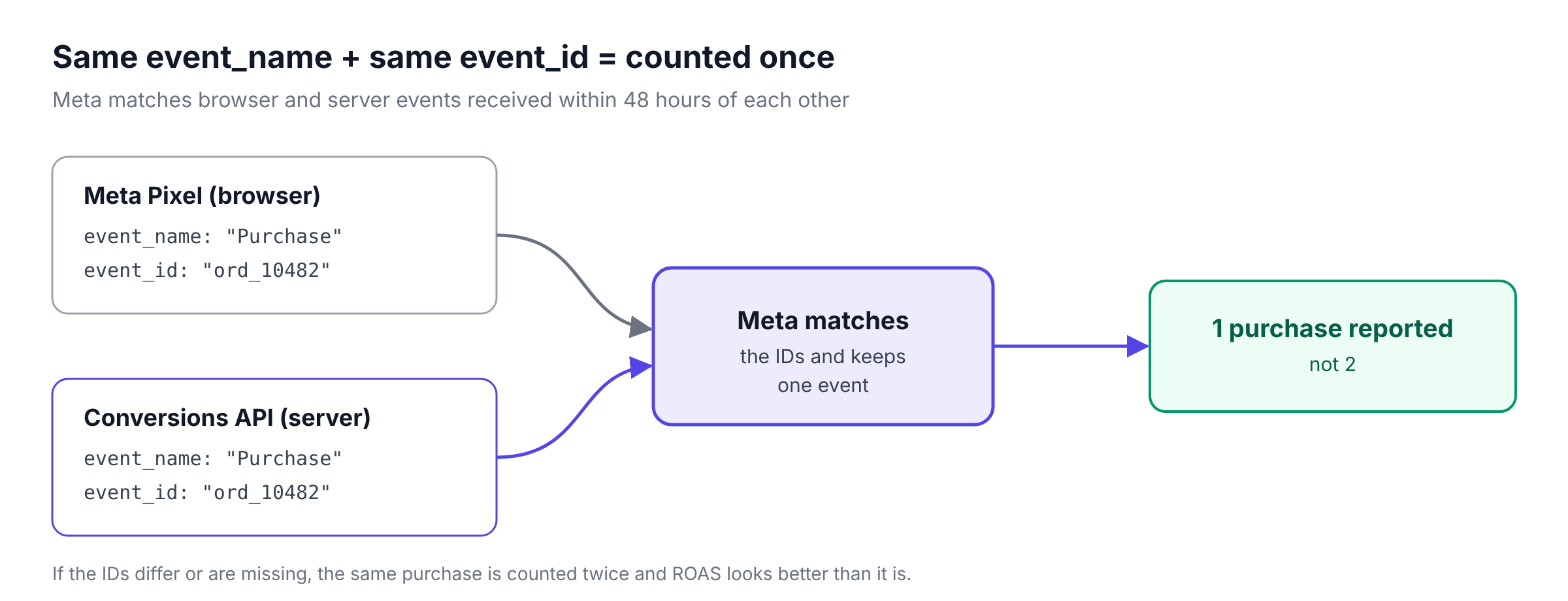
Three rules from Meta's deduplication documentation:
- 48-hour window. Events are only deduplicated if they arrive within 48 hours of the first event with that ID.
- Fallback is weaker. Meta can also deduplicate on
fbporexternal_id, but generally only when the browser event arrives first and the server event second. - Only across sources. Meta does not deduplicate within one source. If your server sends the same purchase twice, it counts twice.
A good event_id is something both the browser and the server know: an order ID, a lead ID or a unique ID your site generates at the moment of conversion and passes to both.
How to check it: in Events Manager, open your dataset (Meta's name for your Pixel and its connected sources), go to Overview, open the event's details and check the Event Deduplication tab and its rate of events deduplicated. If reported purchases suddenly doubled after you switched on the Conversions API, deduplication is the first thing to check.
Event Match Quality: how to raise your score
Meta can only use a server event if it can connect it to a person on Facebook or Instagram. Event Match Quality (EMQ) is Meta's score, out of 10, for how well your server events match. You find it on the Overview page of your dataset in Events Manager. Meta's verification guide suggests aiming for 6.0 or higher, and EMQ is currently available for web events only.
What raises it:
- Send more customer information. Hashed email and phone are the strongest. Add name and
external_idwhere you have them. - Always pass
fbcandfbp. Capture the_fbcand_fbpcookies (or thefbclidfrom the landing page URL) and send them with every server event. Without them, events from people who never gave you an email are hard to match. - Send IP address and user agent from the original visitor, not from your server.
- Normalise correctly before hashing (see above).
Two related metrics in Events Manager are worth watching. Event coverage is the share of your Pixel events that are also sent through the Conversions API. Data freshness shows how long after the event Meta received it.
5 ways to set up the Conversions API
| Option | How it works | Who it suits | Cost | CRM and call events |
|---|---|---|---|---|
| One-click setup in Events Manager | Meta sets up CAPI for website events from your existing Pixel, no code | Small sites that only need website events | Free | No |
| Partner integration | Your website builder, e-commerce platform or tag manager sends events for you | Sites on a supported platform | Usually included | Rarely |
| Conversions API Gateway | Meta's self-serve server, hosted in your own AWS or Google Cloud account | Teams comfortable with cloud accounts | Cloud or partner fees | No |
| Server-side Google Tag Manager | Meta's Conversions API tag in a GTM server container | Teams already using GTM | Server hosting | With custom work |
| Direct integration or attribution platform | Your developers call the API, or a platform like Klarvyn does it for you | Lead-gen, call-based and CRM-driven businesses | Development time or subscription | Yes |
Which one to choose: if all your conversions happen on the website, start with one-click setup or your platform's integration and check deduplication. If your real conversions happen later, in a call or in your CRM, you need an option that can send those events. That usually rules out one-click setup and the Gateway; check whether your platform's integration supports CRM events.
How to test your setup
- Use Test Events. In Events Manager, go to Data Sources, your dataset, then Test Events. Copy the test code and send it as
test_event_codewith your server events. They appear in real time. - Check both sources. Trigger a real conversion on your site and confirm that the browser event and the server event both appear, with the same event ID.
- Remove the test code before you go live. Events sent with it are still processed, so leaving it in makes your live data harder to read.
- Check EMQ and deduplication after 48 hours, once Meta has enough data to score.
- Compare against a baseline. Note your reported conversions for the weeks before the switch, so you can see what changed.
Sending calls and CRM sales to Meta
For e-commerce, the Pixel at least sees the purchase. For lead generation, the Pixel sees the form and nothing after it. If Meta only learns about form fills, it optimises for people who fill in forms, including people who never answer the phone.
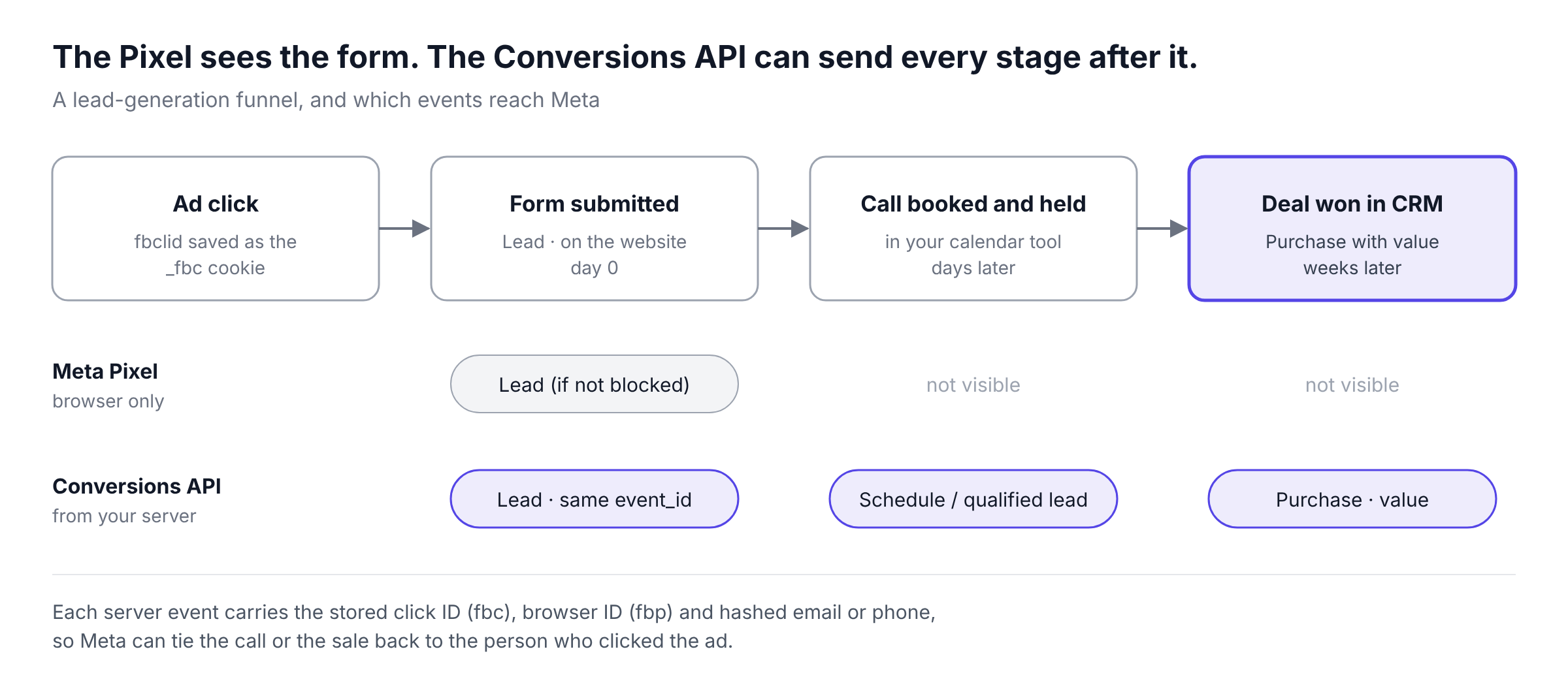
With the Conversions API, you can send each later stage as its own event:
- Lead: the form submission, from both Pixel and server, deduplicated.
- Schedule or a custom qualified-lead event: when a call is booked or held. A call booked on your site is a
websiteevent. A held or qualified call isphone_call(the conversion happened on the call) orsystem_generated(logged by your CRM). - Purchase: when the deal is won in your CRM, with
valueandcurrency.
To make this work, store the visitor's fbc, fbp and email or phone with the lead when they first convert. When the call or sale happens, send the event with that stored information so Meta can match it to the original person.
Two things to keep in mind:
- Send the event when the stage happens.
event_timecan be at most 7 days old when you send it. A CRM sync that runs once a month will lose events. - Optimise for a stage inside your attribution window. Meta's default attribution setting credits conversions within 7 days of a click (1 day after a view or engagement), and 7 days is the longest click window. If deals close later than that, optimise for an earlier stage, such as a qualified lead or a held call, and use the purchase data for reporting.
If you run Meta Lead Ads with Instant Forms, Meta also offers a Conversion Leads integration that sends CRM stages back with action_source system_generated and the Meta lead ID. Meta says it works best with at least 200 leads a month, daily uploads, and a target lead stage that is reached within 28 days and converts at 1–40%.
This is the part of the Conversions API Klarvyn is built for. It collects the form, the call from your calendar tool and the deal from your CRM, keeps the click ID and hashed contact details with each lead, and sends the stages you choose to Meta, as well as to Google and LinkedIn.
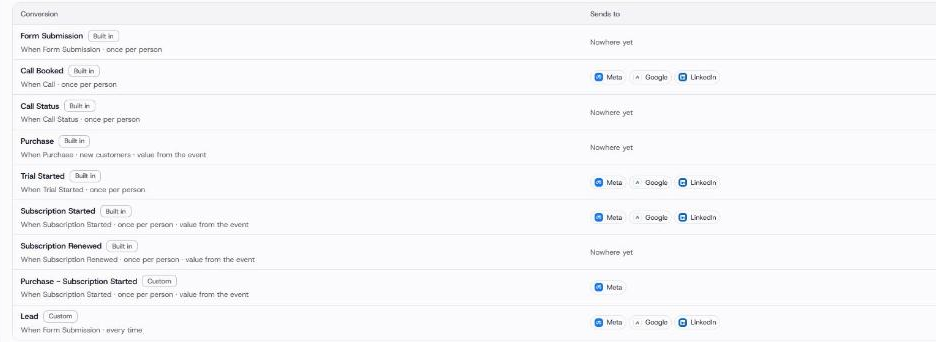
In Klarvyn, each conversion is mapped to the ad platforms it should be sent to.
Privacy and consent
The Conversions API does not remove the need for consent. In the EU and UK you still need consent to track visitors for advertising, whether the event leaves from the browser or your server. See the GDPR section of our server-side tracking guide.
What the Conversions API does make easier:
- Hash personal data with SHA-256 before it leaves your server.
- Send only what is needed and drop events from visitors who declined.
- Limited Data Use. For visitors in certain US states, Meta offers Data Processing Options that you set per event with
data_processing_options.
This section is general information, not legal advice.
Common mistakes
- No
event_id, or different IDs in Pixel and server. Purchases get counted twice and reported ROAS is inflated. - Server IP address instead of the visitor's. Matching gets worse, and EMQ drops.
- Not passing
fbcandfbp. Server events from people without an email address can rarely be matched. - Hashing without normalising. Uppercase letters or spaces produce hashes that never match.
- Batch uploads older than 7 days. The whole request fails, not just the old events.
- Forgetting the test code in production. Live data becomes harder to read.
- Optimising for a stage outside the attribution window. Meta never sees enough credited conversions to learn from.
Frequently asked questions
Is the Meta Conversions API free?
Meta does not charge for using the Conversions API. You may pay for hosting (for example a Conversions API Gateway or a GTM server container), developer time or a platform that handles it for you.
Does the Conversions API replace the Meta Pixel?
No. Meta recommends running both, with deduplication. The Pixel captures browser signals; the Conversions API makes sure events arrive and adds events from your server and CRM.
What is a good Event Match Quality score?
Meta suggests aiming for 6.0 or higher out of 10. Higher is better, and the biggest gains usually come from sending hashed email and phone plus the fbc and fbp values.
How do I know if deduplication is working?
In Events Manager, check the event's details for browser and server events being deduplicated. If reported conversions roughly doubled after you switched on the Conversions API, deduplication is likely failing.
Can I send offline conversions with the Conversions API?
Yes. Meta discontinued the separate Offline Conversions API in May 2025, and offline events now go through the Conversions API with an action_source such as physical_store, phone_call or system_generated.
Does the Conversions API work with ad blockers?
Yes. Once the event reaches your server, it is sent to Meta server to server and cannot be blocked by the visitor's browser. You still need consent to track the visitor in the first place.
Do I need a developer to set up the Conversions API?
Not always. One-click setup in Events Manager and partner integrations need no code for website events. Sending CRM and call events usually needs a developer or a platform built for it.
Summary
The Meta Conversions API sends conversion events from your server to Meta, alongside the Pixel. The difference between a good and a bad setup comes down to three things: matching event_id values so nothing is counted twice, enough customer information for a strong Event Match Quality score, and sending the events that actually make money, not only form fills.
If your sales happen in calls or in your CRM, try Klarvyn free for 14 days and send those stages to Meta without a developer.